A Below Poverty Line (BPL) ration card is an important document for eligible households that depend on government food security programmes. In Karnataka, ration cards help eligible families access subsidised food grains and other benefits under applicable public distribution schemes. Keeping ration card information accurate and completing the required verification procedures can help beneficiaries avoid unnecessary difficulties when accessing these services.
One important process is electronic Know Your Customer verification, commonly known as e-KYC. This process helps verify the identity of ration card beneficiaries and maintain accurate records in the government database.
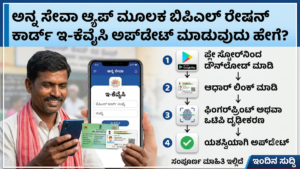
The Karnataka government has introduced the Anna Seve mobile application to help ration card beneficiaries complete e-KYC through Aadhaar-based face authentication, subject to the applicable authentication requirements. According to the application’s official Google Play listing, eligible family members can use the application to complete their prescribed verification through an approved method. Official app information.
This article explains the purpose of BPL ration card e-KYC, how to approach the process through the Anna Seve app, the documents and preparations required, common problems, and important safety precautions.
What Is BPL Card e-KYC?
BPL card e-KYC is an electronic identity verification process associated with a ration card and its registered beneficiaries. It helps the relevant government department check whether the identity information of family members is correctly recorded.
Traditionally, many ration card-related services required beneficiaries to visit a government office or a fair price shop for assistance. Digital verification methods can make some procedures more convenient by allowing eligible beneficiaries to complete authentication using approved electronic systems.
The exact verification process depends on the state government’s system and the authentication method available to the beneficiary.
In Karnataka, Anna Seve is designed specifically to facilitate ration card e-KYC using Aadhaar-based face authentication. The application is intended to make identity verification more accessible through a mobile phone.
It is important to understand that e-KYC is different from applying for a new ration card, changing the household address, adding a family member, or correcting a name. Those activities may require separate procedures.
What Is the Anna Seve App?
Anna Seve is a mobile application published by the Director of e-Governance, Government of Karnataka. Its stated purpose is to support ration card beneficiary verification through Aadhaar-based face authentication.
The app is intended to help eligible beneficiaries complete the prescribed verification process without necessarily having to travel to an office for every verification attempt.
According to the official application description, verification requirements apply to eligible family members listed on the ration card, rather than being limited to the head of the household. The app listing also describes e-KYC as a recurring verification requirement under the applicable government rules.
Beneficiaries should always check the current instructions shown in the official app because features, eligibility conditions, and procedures may change.
Before installing an application, confirm that its publisher is the authorised government developer. Avoid similarly named applications that do not have a verifiable official source.
Why Is BPL Ration Card e-KYC Important?
Completing the required e-KYC process helps maintain accurate beneficiary records. It can also reduce difficulties caused by outdated information or incomplete identity verification.
The major purposes of e-KYC include the following.
1. Identity verification
Electronic verification helps establish that the person completing the process is the intended beneficiary associated with the ration card.
2. Accurate government records
Updated verification records can help the responsible department maintain a more reliable database of eligible households and family members.
3. Better administration of food distribution
Accurate beneficiary information supports the administration of public distribution programmes and helps officials manage ration card records more effectively.
4. Greater convenience
Where supported by the official system, mobile-based verification may reduce the need for beneficiaries to travel to a government office simply to complete identity authentication.
5. Verification of individual family members
The official Anna Seve app description states that every eligible family member listed on a ration card must complete the prescribed e-KYC process. Families should therefore check the verification status of each member rather than assuming that completing the head of household’s verification is sufficient.
Completing e-KYC does not automatically guarantee eligibility for every government benefit. Eligibility continues to depend on the applicable scheme rules and official records.
Documents and Preparations Required
Before starting the e-KYC process, beneficiaries should prepare the necessary information and check that their mobile phone is ready.
The following preparations can help:
- Keep the ration card number or ration card details available if requested by the app.
- Keep the beneficiary’s Aadhaar details available for the authorised authentication process.
- Use a compatible smartphone with a working front-facing camera.
- Ensure that the phone has sufficient battery power.
- Connect to a reliable internet connection.
- Install the official Anna Seve application from its verified source.
- Read the instructions and consent information displayed during authentication.
The precise information required may vary depending on the app version and the beneficiary’s circumstances.
Do not share Aadhaar details, one-time passwords, or other sensitive information with unauthorised people. Enter personal information only through the official application or another authorised government service.
How to Update BPL Card e-KYC Through the Anna Seve App
The following guide explains the general process. Screen names and button labels may differ depending on the current application version.
Step 1: Download the Official Application
Open the Google Play Store on your Android smartphone and search for Anna Seve.
Check that the application is published by the Director of e-Governance, Government of Karnataka. You can also access the official listing using the link provided earlier in this article.
Install the application and allow it to finish downloading before opening it.
Avoid downloading installation files from unknown websites, social media posts, or unofficial messaging groups.
Step 2: Open the App
After installation, open Anna Seve from your phone’s application menu.
Read any introductory information, privacy notices, and instructions displayed on the screen.
Depending on the available version, the application may display citizen access or other authorised login options. Select the appropriate option presented for your circumstances.
If the app requests permissions necessary for face authentication, review those permissions before proceeding.
Step 3: Follow the Available Login or Identification Process
Follow the on-screen instructions to access the relevant ration card e-KYC service.
If the application asks you to identify the beneficiary or provide ration card information, enter the details accurately.
Check every entry before continuing. An incorrect number or mismatched record may prevent the application from identifying the correct beneficiary.
If you cannot locate your ration card or the application does not recognise your details, do not repeatedly submit random information. Contact the official support service or your local food and civil supplies office for guidance.
Step 4: Select the Relevant e-KYC Option
Once you reach the relevant service screen, look for the ration card e-KYC or beneficiary verification option provided by the current app.
The exact menu structure may change as the application is updated. Use only the options displayed by the official application.
If the system displays the beneficiary’s name or ration card information, verify that it corresponds to the correct person before continuing.
Do not proceed if the displayed information belongs to another household or beneficiary.
Step 5: Complete Aadhaar-Based Face Authentication
Anna Seve is designed to support Aadhaar-based face authentication for ration card e-KYC.
If face authentication is available for your case, follow the instructions displayed on the phone. The application may request permission to access the camera and guide you through the identity verification process.
For a better chance of successful authentication:
- Choose a well-lit location.
- Keep your face clearly visible.
- Hold the phone steadily at the recommended distance.
- Remove anything that obstructs the face if instructed by the application.
- Follow the prompts shown on the screen.
- Avoid moving the phone excessively during the capture process.
Face authentication may fail if lighting is poor, the camera cannot capture a clear image, or a technical issue interrupts the process.
If authentication fails, carefully read the error message and follow the recommended next step. Do not assume that an unsuccessful attempt means the ration card has been cancelled.
Step 6: Wait for Verification
After completing the authentication steps, allow the application to process the request.
Keep the app open until it displays a result or indicates that the process has been submitted.
Depending on the system, the result may appear immediately or may require further processing.
Do not close the application prematurely if it indicates that authentication is still underway.
Step 7: Check the Verification Result
Look for the confirmation or status information provided by the application.
If the system confirms successful e-KYC, retain any available reference number or confirmation details for your records.
If the application displays a pending, unsuccessful, or incomplete status, follow its instructions or contact official support.
A submitted request should not automatically be treated as a completed verification. Check the actual status shown by the authorised system.
Step 8: Repeat the Process for Other Eligible Family Members
If several eligible family members are listed on the same ration card, check whether each person has completed the required verification.
The official Anna Seve app description states that verification requirements apply to each eligible family member and are not satisfied merely by verifying the head of the household.
Follow the authorised procedure for every person whose e-KYC remains incomplete. Do not assume that one person’s successful authentication automatically verifies all members of the household.
Common Problems During e-KYC and Their Solutions
Although mobile-based verification can be convenient, some users may experience technical difficulties.
1. The App Is Not Opening
First, check your internet connection and restart the application.
If the problem continues, check whether an update is available through the official app store. You can also restart the phone and try again.
Avoid uninstalling the app before checking whether doing so could affect any locally stored information or an unfinished process.
2. Face Authentication Is Failing
Poor lighting, camera problems, or difficulty following the capture instructions may cause authentication failure.
Move to a brighter location, clean the front camera lens, and follow the instructions carefully.
If the system continues to reject the attempt, use an alternative verification method only if the relevant authority permits it.
3. Ration Card Details Are Not Found
Check whether the information was entered correctly.
If the record still cannot be located, the underlying ration card database may need to be checked by the responsible department. Contact the official helpline or visit an authorised service centre for assistance.
4. The e-KYC Status Remains Pending
A pending status may indicate that processing has not finished or that additional action is required.
Check the app again according to its instructions. If the status does not change, contact official support and provide any reference number generated by the system.
5. Internet Connectivity Is Poor
Use a reliable connection and avoid beginning authentication when the signal is unstable.
If your connection repeatedly drops, try again from a location with better network coverage.
Do not repeatedly submit the same request if the previous attempt may already have been received by the system.
Important Safety Precautions
Ration card e-KYC involves sensitive identity information, so beneficiaries should take precautions.
Use official applications only. Verify the publisher and the app’s authenticity before entering personal details.
Protect your Aadhaar information. Never share your Aadhaar authentication credentials or OTP with an unknown person.
Do not disclose passwords or OTPs to callers. Genuine support staff should not ask you to reveal confidential authentication information unnecessarily.
Avoid unauthorised agents. Be cautious if someone demands money or promises guaranteed approval in exchange for personal details.
Check the final status. Keep the confirmation or reference details available if the application provides them.
Seek help from authorised offices. If you cannot complete the process independently, ask the local food and civil supplies department or an authorised service centre for assistance.
These precautions can help reduce the risk of fraud and protect your personal information.
What Should You Do If You Cannot Complete e-KYC Online?
Not every beneficiary will be able to complete mobile authentication successfully. Some people may have an incompatible device, poor internet connectivity, or difficulties with face recognition.
In such cases, contact the Karnataka Food and Civil Supplies Department or an authorised ration card service centre to ask about the approved alternative process.
Depending on the rules applicable to your case, an authorised centre may be able to guide you through another permitted authentication method.
Before visiting an office, ask which documents are required and whether an appointment or additional verification is necessary.
For official application support, the Anna Seve Google Play listing provides the following contact information:
- Toll-free helpline: 1800-425-9339
- Support email: com.fcs-ka@nic.in
Check the current official listing before relying on these details, as contact information can change.
Frequently Asked Questions
1. Can I complete BPL card e-KYC using the Anna Seve app?
The Anna Seve app is designed for ration card e-KYC verification in Karnataka using Aadhaar-based face authentication, subject to applicable requirements and eligibility.
2. Is it necessary to verify every family member?
According to the official app description, every eligible family member listed on the ration card must complete the prescribed verification. Confirm the status of each member.
3. Is e-KYC the same as applying for a new BPL card?
No. e-KYC is an identity verification process. Applying for a new ration card or changing existing card details may require separate procedures.
4. What happens if face authentication fails?
Check the camera, lighting, internet connection, and instructions. If the problem continues, contact official support and ask about an approved alternative verification method.
5. Does successful e-KYC guarantee ration benefits?
No. Successful identity verification does not independently guarantee eligibility for every benefit. The applicable scheme rules and the official beneficiary record determine eligibility.
6. Is the Anna Seva app available throughout Karnataka?
Availability and access arrangements may change over time. Check the current official application listing and government announcements to confirm whether the service is available for your district and situation.
Conclusion
Updating BPL ration card e-KYC is an important step in maintaining accurate beneficiary records and complying with applicable verification requirements. The Anna Seve mobile application provides Karnataka ration card beneficiaries with a digital option for Aadhaar-based face authentication, where the service is available and the user meets the relevant requirements.
The process generally involves installing the official app, following its identification instructions, completing the required authentication, and checking the final verification status. Beneficiaries should also check whether every eligible family member listed on the ration card has completed the prescribed verification.
If the application does not work or the verification remains incomplete, seek assistance from the official food and civil supplies department or an authorised service centre.
By following the official instructions, protecting personal information, and checking the final status carefully, beneficiaries can approach the e-KYC process more confidently and reduce avoidable delays.
Important note for readers: This article is an informational guide written in original language. Application screens, verification rules, service availability, and contact details may change. Always follow the latest official instructions provided by the Government of Karnataka and the authorised Anna Seve application.